

AI automation for ecommerce is most valuable when it removes repetitive work without removing accountability. A useful system does not simply generate text or place a chatbot on a website. It watches for a defined event, gathers the right business context, performs a narrow task, records what happened and sends uncertain or high-risk cases to a person.
For an Indian ecommerce business, that could mean identifying an incomplete address before dispatch, preparing a reply when a customer asks for an order update, finding missing product attributes, flagging a sudden inventory mismatch or creating a morning report from several systems. The objective is not “use AI everywhere.” It is to reduce avoidable manual effort, errors and response time while preserving human control.
Quick answer: Start with high-volume, low-risk workflows that have clear inputs and measurable outcomes. Good first candidates include support classification, order-status responses, product-data checks, review analysis and daily operational reporting. Keep refunds, cancellations, pricing changes, legal claims and unusual fulfilment decisions behind human approval until the system has proven reliable.
What AI automation for ecommerce actually means
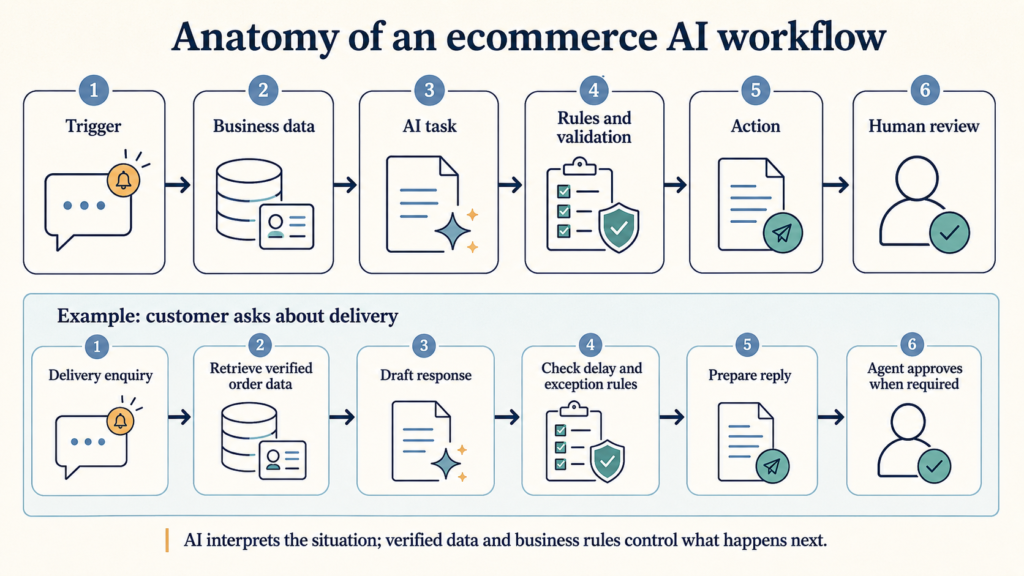
AI automation combines a business trigger, data, an AI capability, workflow rules and an action. Each element matters:
- Trigger: something happens, such as a new ticket, paid order, low-stock event or failed product-feed update.
- Context: the workflow retrieves relevant information from the ecommerce platform, order system, CRM, help desk, product catalogue or analytics tool.
- AI task: the model classifies, extracts, summarises, predicts or drafts.
- Rules: deterministic logic checks permissions, confidence, thresholds and exceptions.
- Action: the system updates a field, sends an alert, prepares a response or creates a task.
- Human checkpoint: a person reviews cases where the financial, customer or compliance consequence is material.
This distinction is important because a language model alone is not an operational system. It may understand an unstructured customer message, but the surrounding workflow must decide which records it can access, what it may change and when approval is required.
AI automation versus rule-based automation
Traditional automation is best when conditions are explicit. For example: “If inventory reaches five units, notify purchasing.” AI is useful when the input is variable or unstructured: “Read this customer message and determine whether it concerns delivery, damage, cancellation or a product question.”
| Requirement | Rule-based automation | AI-assisted automation |
|---|---|---|
| Best suited to | Stable, explicit conditions | Language, images, patterns and ambiguous inputs |
| Example | Send a low-stock alert below a threshold | Summarise why several products are repeatedly going out of stock |
| Predictability | High when rules are complete | Probabilistic; requires evaluation and guardrails |
| Human review | Needed mainly for exceptions | Needed according to confidence and consequence |
| Strongest design | Use AI to interpret; use rules to authorise and execute | |
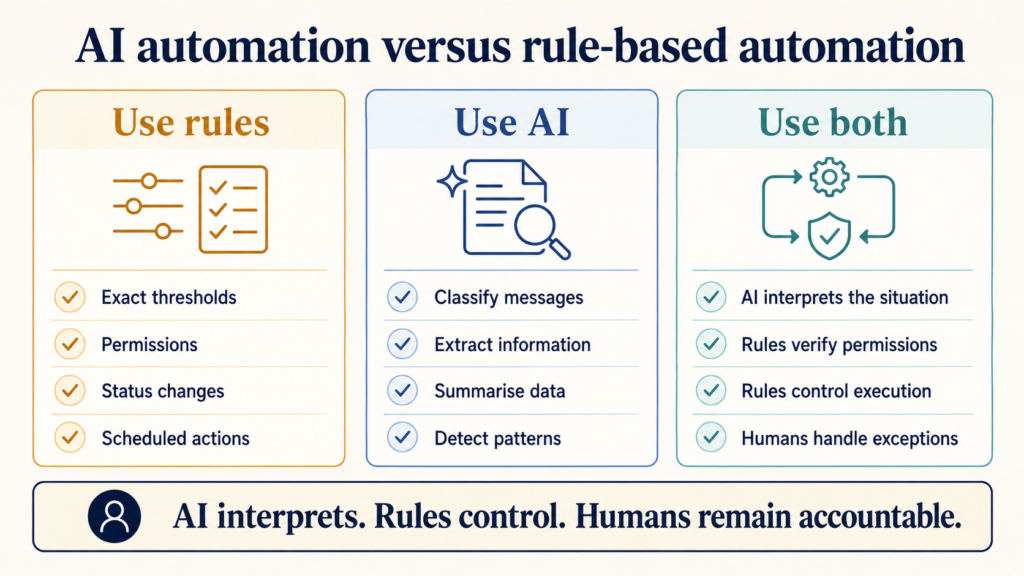
The safest ecommerce architecture normally combines both approaches. AI can interpret an address-change request, while rules verify whether the order is paid, whether fulfilment has started and whether the user has permission to change the address.
15 practical AI automation workflows for ecommerce
1. Customer-support classification and routing
A support system can read incoming email, chat or WhatsApp messages and classify them by intent, urgency, language and sentiment. It can route a delivery complaint to operations, a damaged-product report to resolution and a presales question to the relevant team.
Human checkpoint: review low-confidence classifications, threats, legal notices, payment disputes and highly negative messages. Measure routing accuracy and transfer rate—not merely the number of tickets processed.
2. Order-status response preparation
Instead of giving a generic “your order is being processed” reply, an assistant can retrieve the order, promised delivery date, fulfilment state and tracking event, then prepare a grounded response. The workflow should answer only from verified order data and clearly say when an update is unavailable.
Human checkpoint: require approval when an order is late, partially fulfilled, cancelled, high value or associated with an unresolved complaint. Never let a model invent a delivery commitment.
3. Abandoned-cart follow-up prioritisation
Not every abandoned cart deserves the same message or discount. A workflow can group carts by value, customer history, product availability and time since abandonment. It may suppress outreach for out-of-stock items, create a reminder for a returning customer or flag a high-value cart for personal assistance.
Human checkpoint: approve discount rules and communication frequency. Respect marketing consent, channel policies and opt-out preferences.
4. Product-title and description enrichment
AI can transform structured product facts into clearer titles, bullet points, descriptions, FAQs and metadata. The important word is structured: the workflow should start from verified attributes such as material, size, colour, compatibility and care instructions rather than asking a model to guess from a short name.
Human checkpoint: review health, safety, performance, warranty and comparative claims. Google advises site owners to prioritise accurate, relevant and helpful content; scaled pages created without value can violate spam policies. AI-generated product data supplied to Merchant Center also has specific labelling requirements. See Google Search Central’s guidance on generative AI content.
5. Product categorisation and tagging
Large catalogues often contain inconsistent product types, tags and attributes. AI can propose taxonomy assignments from the title, description, images and existing data, while validation rules prevent mutually incompatible tags and preserve accepted legacy values.
Human checkpoint: review new categories, low-confidence assignments and bulk changes before publishing. Keep a change log and a reversible export. Taxonomy automation should improve navigation and feeds, not create hundreds of near-duplicate labels.
6. Product-image and missing-data checks
A workflow can identify products with missing images, extreme aspect ratios, unreadable backgrounds, duplicate media or incomplete fields. Computer vision may also propose colour, product type or composition attributes, but those suggestions should be validated against catalogue rules.
Human checkpoint: review subjective quality decisions and never infer sensitive or safety-related attributes from an image alone.
7. Inventory monitoring and low-stock explanation
Rule-based thresholds can raise an alert; AI adds value by summarising the surrounding context. It can compare recent sales, incoming purchase orders, campaign activity and historical stockouts to explain which products need attention first.
Human checkpoint: purchasing or merchandising should approve replenishment quantities. Forecasts are decision support, not certainty—especially for seasonal products and new launches.
8. Suspicious-order and fraud-review assistance
AI can summarise risk signals across order value, address changes, repeated attempts, unusual item combinations and account history. It can help a reviewer understand why an order was flagged, reducing the time required to inspect multiple systems.
Human checkpoint: do not automatically cancel solely because a generative model labels an order suspicious. Use the payment provider’s fraud controls, deterministic policies and trained review staff. Record the reason for every adverse action.
9. Review analysis and sentiment detection
Thousands of reviews are difficult to interpret manually. AI can group them into topics such as delivery, packaging, product accuracy, freshness, sizing or support, then show which themes are improving or declining.
Human checkpoint: inspect source reviews behind every important conclusion. Aggregated sentiment can hide sarcasm, language differences and small but serious safety issues.
10. Google Merchant Center feed monitoring
A monitoring workflow can detect rejected items, missing identifiers, price mismatches and sudden drops in active products, then summarise the affected categories and likely causes. Google’s Merchant API supports automated management of products, inventory and Merchant Center accounts, but merchants remain responsible for product-data accuracy and policy compliance. See the Merchant API overview.
Human checkpoint: review policy-related disapprovals, pricing changes and large feed corrections. Automation should not repeatedly resubmit incorrect data.
11. Advertising and conversion-report summaries
AI can combine approved metrics from Google Ads, Meta Ads and GA4 into a daily or weekly narrative: what changed, which campaigns contributed, what data is incomplete and which anomalies need investigation. The report should retain links to the underlying dashboards.
Human checkpoint: a marketer must validate attribution, tracking health and statistical significance before changing budgets. A model should not treat correlation as causation.
12. Customer segmentation assistance
A workflow can create operational segments such as first-time customers, repeat purchasers, high-value inactive customers or buyers of a particular category. AI can help describe behavioural patterns while SQL or platform rules determine actual membership.
Human checkpoint: approve the data used, exclude sensitive attributes and review whether a segment could result in unfair or intrusive treatment.
13. Repeat-purchase and replenishment reminders
For consumable or regularly replaced products, automation can estimate a sensible reminder window using purchase history and product type. It can draft a useful reminder rather than sending the same schedule to every customer.
Human checkpoint: require marketing consent and cap frequency. Do not imply knowledge of consumption, health conditions or personal circumstances that the customer did not provide.
14. Delivery-delay and fulfilment-exception alerts
A workflow can compare promised dates with fulfilment and courier events, identify orders at risk and prepare an exception queue before customers complain. AI can summarise the situation and recommend the next approved action: contact the vendor, request tracking confirmation or notify support.
Human checkpoint: operations must approve revised promises, refunds, replacements and compensation. The system should preserve the original commitment and every subsequent update.
15. Daily management reports
A daily report can combine orders, revenue, fulfilment exceptions, support volume, low stock, feed issues and advertising signals into one prioritised briefing. This is often a strong early use case because it assists decision-making without directly changing customer or financial records.
Human checkpoint: each metric needs a defined source and timestamp. The report must distinguish verified numbers from AI interpretation and make missing data visible.
Workflow comparison at a glance
| Workflow | Trigger | AI task | Human checkpoint | Expected benefit |
|---|---|---|---|---|
| Support routing | New message | Classify intent and urgency | Low-confidence or high-risk cases | Faster first response |
| Order-status reply | Status enquiry | Draft from verified order data | Late, disputed or unusual orders | Consistent support |
| Cart follow-up | Checkout abandoned | Prioritise and personalise | Discount and consent rules | More relevant outreach |
| Product enrichment | New or incomplete product | Draft content from attributes | Claims and factual review | Faster catalogue work |
| Tagging | Catalogue import/update | Propose taxonomy | Bulk-change approval | Cleaner navigation and feeds |
| Image/data QA | Product saved | Detect missing or poor data | Subjective decisions | Fewer listing defects |
| Inventory insight | Threshold or anomaly | Summarise demand context | Purchase approval | Better prioritisation |
| Fraud assistance | Risk flag | Summarise signals | All adverse actions | Faster review |
| Review analysis | Review batch received | Cluster themes and sentiment | Inspect source evidence | Actionable feedback |
| Feed monitoring | Diagnostics change | Group errors and causes | Policy and bulk corrections | Quicker recovery |
| Marketing summary | Daily/weekly schedule | Explain metric changes | Attribution and budget decisions | Less reporting effort |
| Segmentation | Customer-data refresh | Describe behaviour patterns | Privacy and eligibility rules | Better targeting |
| Replenishment | Estimated repeat window | Draft reminder | Consent and frequency | Timely repeat purchases |
| Delivery exceptions | Order at risk | Summarise and recommend | Promises and compensation | Proactive resolution |
| Management report | Daily schedule | Prioritise cross-system signals | Verify material anomalies | Faster decisions |
What should not be fully automated
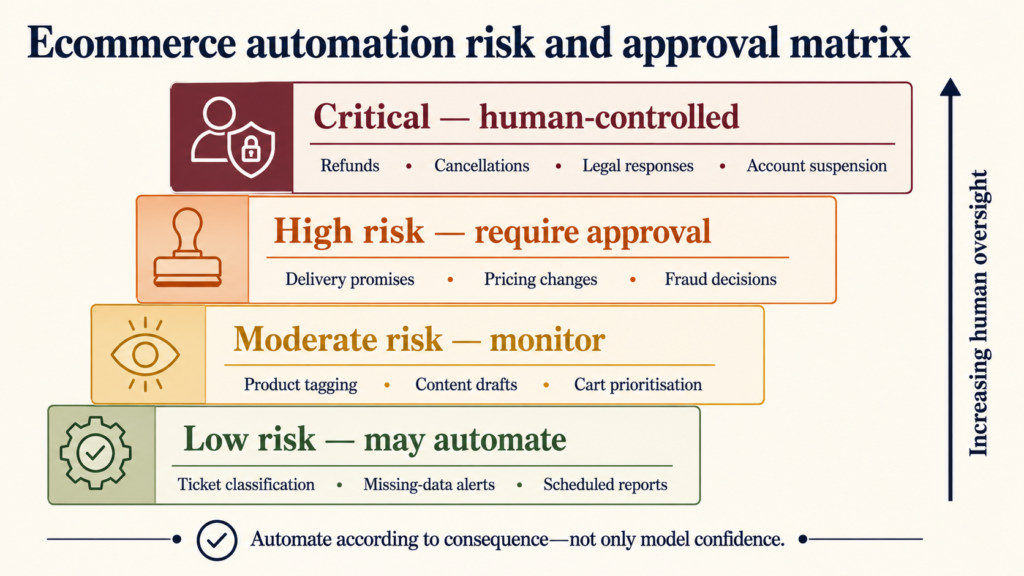
Some actions carry too much financial, legal or customer consequence to delegate without strong controls. Keep a person in the loop for:
- Refunds, cancellations, replacements and compensation
- Price changes and discount-policy exceptions
- Claims about health, safety, performance or legal compliance
- Suspending customers, vendors or employees
- High-value purchasing and inventory commitments
- Responses to legal notices, threats or payment disputes
- Changing confirmed delivery promises
- Publishing large batches of generated product content without review
“Human in the loop” should not mean a person blindly clicks Approve. The reviewer needs the source data, proposed action, model confidence where available and a clear way to correct the output.
A practical implementation roadmap
Step 1: choose one measurable bottleneck
Start with a process that occurs frequently and has an identifiable cost. Examples include manual ticket sorting, repeated order-status enquiries or checking product imports for missing fields. Record the current volume, handling time, error rate and escalation rate.
Step 2: map the existing process
Document the trigger, required data, current decision rules, actions, exceptions and owner. Automating a poorly understood process usually makes its problems faster and less visible.
Step 3: define permissions and boundaries
Specify what the workflow may read, draft, update and never do. Use minimum necessary access. Separate a system that prepares an action from the credential that executes it wherever the consequence is material.
Step 4: build a test set
Collect representative historical cases, including difficult and rare examples. Remove or protect unnecessary personal data. Define what a correct result looks like before selecting prompts or models.
Step 5: run in shadow mode
Let the automation produce recommendations without executing them. Compare its outputs with actual staff decisions. This reveals accuracy, failure modes and missing business rules without creating customer impact.
Step 6: introduce confidence-based handling
Allow straightforward, low-risk cases to proceed and send the rest to a queue. Confidence alone is not enough: a high-confidence refund recommendation can still require approval because the consequence is financial.
Step 7: monitor outcomes continuously
Track processing time, acceptance rate, correction rate, false positives, escalations, customer satisfaction and business outcomes. Review samples of successful-looking cases too; silent errors are more dangerous than visible failures.
How to evaluate return on investment
Measure value against the original process, not against a demonstration. A simple framework is:
- Time saved: cases processed × minutes reduced
- Errors avoided: reduction in rework, refunds or feed failures
- Response improvement: change in first-response or resolution time
- Revenue influence: incremental conversions or retained customers, measured cautiously
- Operating cost: model usage, integration, monitoring, maintenance and human review
Include the cost of handling failures. An automation that saves ten hours but creates repeated customer escalations is not efficient.
Data privacy, security and reliability controls
Before connecting an AI service to ecommerce data, determine which personal and commercial information is genuinely required. Avoid sending full payment details, passwords, authentication tokens or unrelated customer history to a model.
Useful controls include:
- Role-based access and separate service accounts
- Encryption in transit and at rest
- Redaction of unnecessary personal information
- Audit logs for inputs, decisions, approvals and changes
- Versioning for prompts, models and business rules
- Rate limits and cost limits
- Fallback behaviour when an API or model is unavailable
- Regular evaluation against a maintained test set
- Retention and deletion policies
Do not assume a workflow remains accurate because it worked at launch. Product catalogues, policies, integrations and customer behaviour change. Every production automation needs an owner.
How RankChief approaches ecommerce automation
We begin with the operating process and measurable outcome, then select the smallest dependable combination of APIs, rules and AI capabilities. For stores that also need platform work, see our Shopify development services and ecommerce development services.
A typical engagement may include workflow discovery, data mapping, API integration, approval queues, audit logs, evaluation cases and post-launch monitoring. The result should fit the team that will operate it—not require permanent dependence on an opaque prototype.
Frequently asked questions
What is the best first AI automation for an ecommerce business?
Choose a frequent, low-risk task with clear evidence and an existing human process. Support classification, order-status drafting, catalogue QA and daily reporting are often suitable. The right choice depends on where the business currently loses the most time or creates the most avoidable errors.
Can AI automate an entire ecommerce store?
It can assist many workflows, but full autonomy is rarely sensible. Merchandising, refunds, customer exceptions, policy decisions and high-value operational changes require accountable human judgement. Reliable automation is selective.
Does an ecommerce business need a large catalogue to benefit?
No. A smaller store may benefit from support, reporting and order-operation workflows. Catalogue enrichment becomes more valuable as the number of products, variants and channels increases.
Can AI automation connect Shopify with an OMS, CRM or help desk?
Yes, when the platforms expose appropriate APIs, webhooks or approved connectors. The design should validate identities, permissions, duplicate events and retry behaviour before allowing updates across systems.
How long does implementation take?
A narrow proof of concept may take days or weeks; a production workflow with integrations, testing, permissions and monitoring takes longer. Complexity depends more on data quality, exception handling and system access than on the prompt itself.
Will AI-generated content rank in Google?
Google’s guidance focuses on content quality and purpose rather than whether automation was used. Content created primarily to manipulate rankings can violate spam policies. Product and editorial content should be accurate, original, useful and reviewed by someone with relevant knowledge.
How should an ecommerce business choose an automation agency?
Ask how the agency will measure accuracy, protect data, handle failures, log changes and transfer operational knowledge. A credible proposal should explain the human checkpoint and maintenance plan—not only show an impressive chatbot demonstration.
Final recommendation
Do not begin with a target such as “automate 50% of the business.” Begin with one documented bottleneck and a baseline. Use AI where interpretation is genuinely required, deterministic rules where certainty is possible and human approval where consequences are material.
The most durable ecommerce automations are often unglamorous: cleaner product data, earlier exception alerts, faster support routing and better daily visibility. Those systems build trust because their contribution can be measured.
Sources and further reading
- Shopify: AI transformation for ecommerce
- Shopify: Generative AI use cases in ecommerce
- Google for Developers: Merchant API overview
- Google Search Central: Guidance on generative AI content
- Google Search Central: Optimising for AI features
Last fact-checked: 24 August 2026. Platform capabilities, policies and APIs can change; verify current documentation before implementation.