

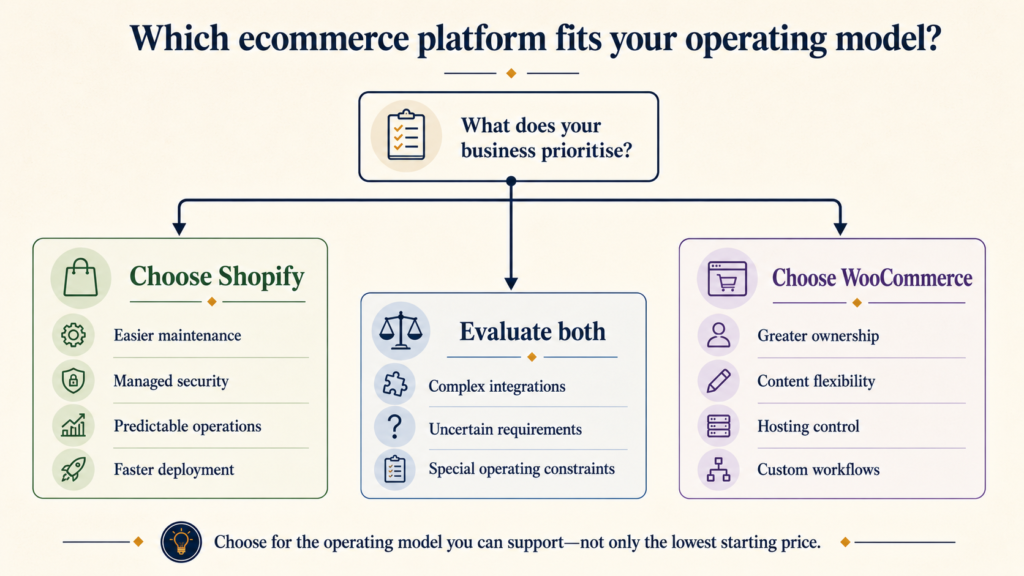
For most Indian businesses that want to launch quickly with a small technical team, Shopify is the more predictable choice. WooCommerce is often the better fit when the business already depends on WordPress, needs deeper code and server control, or has reliable technical ownership. Neither platform is universally cheaper. The better decision depends on total cost, payment volume, maintenance capacity, content requirements and the amount of customisation the business genuinely needs.
This comparison is written for Indian founders, D2C teams and established retailers—not for a generic global audience. It considers INR platform costs, third-party payment fees, Indian gateway requirements, GST and invoicing workflows, technical maintenance, SEO and the practical cost of keeping the store reliable after launch.
Quick answer: Choose Shopify when speed, predictable infrastructure, a managed checkout and lower day-to-day technical responsibility matter most. Choose WooCommerce when content is central to the business, the team already understands WordPress, or deep ownership of the code, database and hosting environment is a strategic requirement. Compare the complete three-year operating model—not merely Shopify’s subscription against WooCommerce’s free plugin.
Shopify vs WooCommerce in India at a glance
| Decision area | Shopify | WooCommerce |
|---|---|---|
| Platform model | Hosted commerce platform | Open-source WordPress plugin installed on your hosting |
| Initial setup | Usually faster and more standardised | More choices and more technical decisions |
| Platform cost | Recurring subscription | Core plugin is free; hosting and extensions vary |
| Hosting and infrastructure | Managed by Shopify | Selected and managed by the merchant or its provider |
| Maintenance responsibility | Platform, hosting and core checkout managed by Shopify | WordPress, WooCommerce, PHP, theme, plugins, backups and security must be maintained |
| Customisation | Strong theme and app ecosystem within platform boundaries | Very broad code, database and server-level control |
| Indian online payments | Third-party gateways; Shopify may also charge a plan-based transaction fee | Third-party gateways; WooCommerce does not add a platform transaction fee |
| Content publishing | A capable but commerce-first blogging system | WordPress provides deeper content-management flexibility |
| SEO control | Good fundamentals with some platform constraints | Extensive control, accompanied by greater technical responsibility |
| Best suited to | Teams prioritising speed, reliability and operational simplicity | Teams prioritising ownership, content flexibility and deep customisation |
Our practical verdict: Shopify is usually the safer default for a new Indian ecommerce team without dedicated web operations. WooCommerce becomes compelling when the organisation has a clear reason to own and maintain more of the stack. “Free” and “hosted” describe licensing and architecture; they do not, by themselves, tell you which platform will cost less to operate.
The fundamental difference: managed platform versus owned stack
Shopify bundles the commerce platform, hosting, security infrastructure, admin, checkout and core updates into a subscription. The merchant configures the store, theme, catalogue, apps and business integrations, while Shopify operates the underlying hosted platform.
WooCommerce is an open-source ecommerce plugin for WordPress. The software can be downloaded and installed without a WooCommerce licence fee, but the merchant still needs a domain, hosting, WordPress, a theme, suitable extensions, backups, security controls and technical maintenance. WooCommerce’s own documentation describes this as control over the cost and configuration of the hosting and functionality you choose.
This architectural difference affects almost every later decision:
- Who handles software and database updates?
- Who responds when a plugin conflicts with the checkout?
- Who scales the hosting during a campaign?
- Who maintains backups and verifies that restoration works?
- How much freedom does the development team need?
Shopify reduces the number of infrastructure decisions. WooCommerce increases control but also expands the surface area the business must operate.
Cost comparison: calculate ownership, not just entry price
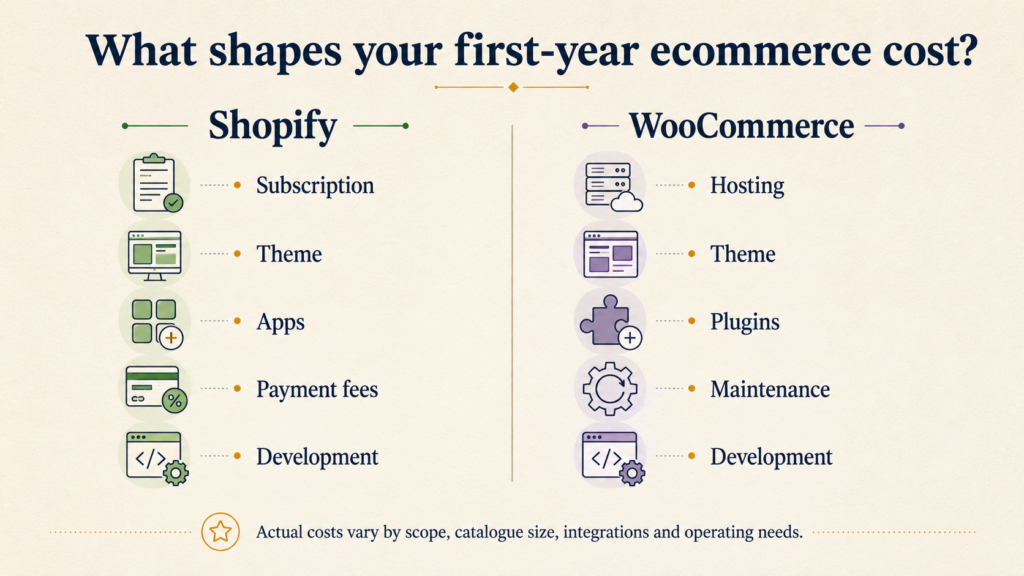
The misleading comparison is “Shopify is paid; WooCommerce is free.” WooCommerce’s core plugin is free, but a functioning commercial store has other costs. Shopify’s subscription is visible upfront, while some WooCommerce costs are distributed across hosting, premium extensions, maintenance and developer time.
Current Shopify prices in India
As checked on 24 August 2026, the official Shopify India pricing page lists the following standard plan prices. Promotional offers can change, so long-term budgeting should use the normal price rather than an introductory discount.
| Shopify plan | Paid yearly | Paid monthly | Additional staff accounts |
|---|---|---|---|
| Basic | ₹1,499/month | ₹1,994/month | None |
| Grow | ₹5,599/month | ₹7,447/month | Up to 5 |
| Advanced | ₹22,680/month | ₹30,164/month | Up to 15 |
| Plus | Contact Shopify | From ₹1,75,000/month | Designed for complex organisations |
For a more detailed build and first-year budget, see our guide to Shopify website development cost in India.
Typical WooCommerce cost components
WooCommerce does not have one universal Indian price because the merchant assembles the stack. A realistic budget may include:
| Component | How it is charged | What changes the cost? |
|---|---|---|
| WooCommerce core | Free to download and install | The plugin itself has no licence fee |
| Hosting | Monthly or annual | Traffic, catalogue, database load, backups, support and server management |
| Theme | Free, annual or one-time | Design quality, updates, support and customisation |
| Extensions | Free, annual or usage-based | Subscriptions, bookings, search, feeds, shipping and other requirements |
| Development | Project or retainer | Templates, checkout, integrations, catalogue and custom logic |
| Maintenance | Internal time or recurring retainer | Updates, testing, security, monitoring and incident response |
| Performance and security | Included in hosting or purchased separately | CDN, caching, firewall, malware scanning and traffic peaks |
For planning—not as fixed market tariffs—a small WooCommerce store in India may spend ₹6,000–₹25,000 annually on suitable managed hosting, while stores with meaningful traffic or heavier catalogues can require substantially more. Premium extensions can range from zero to well above ₹1 lakh annually depending on the stack. Development and maintenance can be lower than Shopify, similar to it, or considerably higher.
The honest comparison is therefore:
- Shopify: subscription + theme/apps + development + payment costs + ongoing improvements.
- WooCommerce: hosting + theme/extensions + development + payment costs + infrastructure and maintenance ownership.
Indian payment gateways and transaction fees
Payments are one of the most important India-specific differences.
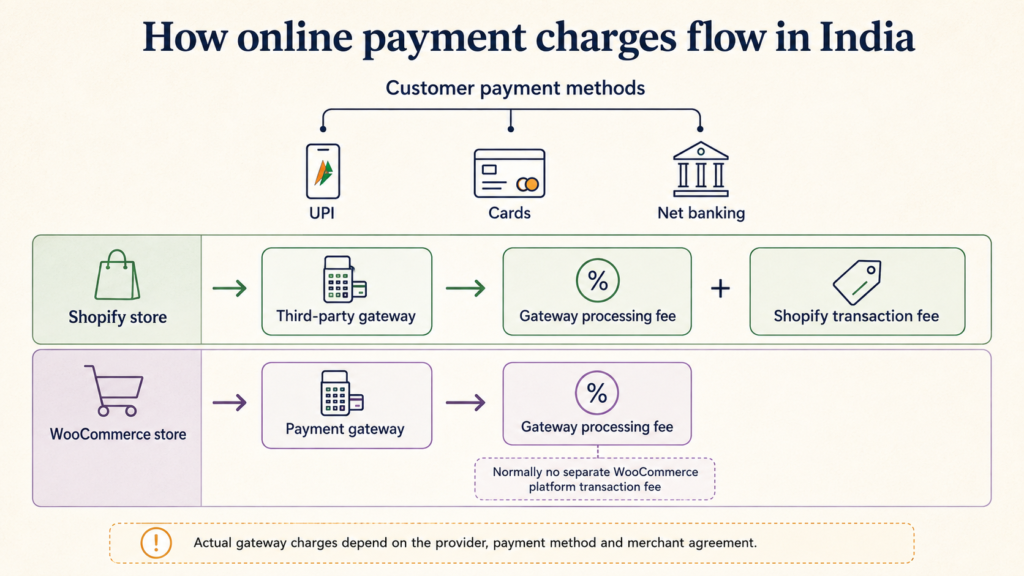
As of this fact check, India does not appear on Shopify’s supported-country list for Shopify Payments. Indian merchants therefore normally integrate a supported third-party gateway. Shopify’s India pricing page currently lists third-party transaction rates of 2% on Basic, 1% on Grow, 0.6% on Advanced and 0.2% on Plus. These Shopify charges can apply in addition to the payment provider’s own processing fee.
WooCommerce itself does not charge a percentage of each transaction. The merchant pays the selected gateway according to that provider’s agreement, plus any extension or integration cost. This can make WooCommerce economically attractive at higher eligible online-payment volumes, although the saving must be weighed against hosting and maintenance costs.
Do not compare fees using total revenue alone. Separate:
- Prepaid online orders processed by an eligible third-party gateway
- Cash on delivery and bank-transfer orders
- Refunds, disputes and international payments
- Gateway fees and applicable taxes
- Shopify’s plan-based third-party transaction fee
Shopify states that manual payment methods such as cash on delivery and bank transfers are not charged its third-party transaction fee. Terms can change, so confirm both the platform and gateway documentation before committing to a financial model.
A simple transaction-fee break-even method
Suppose an Indian store is considering a higher Shopify plan because it offers a lower third-party transaction rate. Calculate:
- Eligible monthly online-payment volume
- Difference between the two Shopify transaction percentages
- Expected monthly saving
- Additional monthly subscription cost
Upgrade only when the saving and operational features justify the additional subscription. The higher plan is not automatically better. Shopify’s Basic plan currently permits no additional staff users, while Grow permits up to five, so team access can be an equally important reason to upgrade.
GST, invoices and Indian operating requirements
Both platforms can support Indian tax and invoice workflows, but neither removes the need to configure the business rules correctly.
Requirements may include:
- GST-inclusive or GST-exclusive product pricing
- Different tax classes
- Place-of-supply and interstate considerations
- GSTIN collection for B2B orders
- HSN or SAC information
- Tax invoices and credit notes
- Accounting or ERP synchronisation
- COD reconciliation
WooCommerce exposes extensive tax configuration and extensions, but flexibility increases the possibility of inconsistent settings. Shopify has a more controlled admin, while India-specific invoicing or accounting needs may require an app or integration. In either platform, tax treatment should be confirmed with a qualified tax professional; the ecommerce developer should implement the approved rules, not invent them.
Design, themes and conversion customisation
Both platforms can produce fast, attractive and high-converting storefronts. Platform choice does not compensate for weak product photography, confusing information architecture or an untested mobile purchase flow.
Shopify design model
Shopify themes use reusable sections, templates and Liquid. A capable theme can provide a professional launch quickly, while custom sections allow differentiated merchandising. Shopify’s constraints can be helpful: developers work inside a consistent commerce architecture, reducing the number of ways the store can be assembled poorly.
Custom checkout control is more limited on standard plans than the control available over storefront templates. Businesses with unusual checkout or account requirements should confirm platform and plan limitations during discovery.
WooCommerce design model
WooCommerce can use a WordPress theme, block theme, page builder or a fully custom implementation. It offers broad control over templates, code and server behaviour. That freedom is valuable when the experience genuinely needs it, but it can also create a fragile store if several builders, plugins and custom snippets compete for the same interface.
For either platform, prefer a smaller number of well-built reusable components over dozens of one-off page designs.
SEO: which platform can rank better?
Neither Shopify nor WooCommerce receives a ranking advantage simply because of the platform name. Search performance depends on crawlability, information architecture, page quality, performance, internal linking, structured data, reputation and how well the content satisfies search intent.
Shopify SEO strengths and constraints
- Reliable hosting, HTTPS and core platform maintenance
- Automatic sitemap generation and standard canonical handling
- Editable titles, descriptions, redirects and image alt text
- Structured product and collection architecture
- Some fixed URL structures and less server-level control
- App or theme code can still affect speed and duplicate content
WooCommerce SEO strengths and responsibilities
- Deep control over WordPress content types, URLs, templates and schema
- Strong editorial workflows for content-heavy websites
- Flexible technical SEO through code and plugins
- Performance depends heavily on hosting, theme, database and plugin quality
- Conflicting SEO, cache or schema plugins can create technical problems
- The merchant owns more of the monitoring and maintenance burden
WooCommerce offers more control; Shopify removes more opportunities for infrastructure mistakes. The better SEO platform is the one the organisation can operate consistently. A perfectly configurable system does not help if updates are ignored, templates are duplicated and performance problems remain unresolved.
For visibility in AI Overviews and AI Mode, Google’s official guidance remains grounded in ordinary search fundamentals: accessible pages, useful original content, clear structure and accurate information. No special “AI schema” or llms.txt file is required.
Performance, security and reliability
Shopify operates the hosting layer and core commerce infrastructure. This gives merchants a predictable baseline and removes routine server administration. It does not guarantee a fast storefront: oversized images, excessive tracking scripts, heavy apps and poor theme code can still damage user experience.
WooCommerce performance can be excellent, but the outcome depends on the assembled stack. Hosting resources, PHP and database versions, cache configuration, object storage, CDN, theme quality and extension behaviour all matter. WooCommerce recommends current supported server software and warns that unsuitable environments can produce security vulnerabilities and poor performance.
Security responsibility also differs:
| Responsibility | Shopify | WooCommerce |
|---|---|---|
| Core platform and hosting updates | Managed by Shopify | Merchant/host manages WordPress, WooCommerce and server stack |
| Theme and extension quality | Merchant remains responsible for selections and custom code | Merchant remains responsible for selections and custom code |
| Backups and restore process | Platform resilience is managed, but business data backup strategy may still be useful | Merchant must arrange and test backups |
| SSL and checkout security | Core hosted environment managed by Shopify | Merchant and host must maintain the environment and SSL |
| Account access | Merchant manages permissions and authentication | Merchant manages WordPress, hosting, database and related access |
Apps, plugins and integrations
Shopify apps and WooCommerce extensions solve similar needs: reviews, subscriptions, loyalty, search, feeds, shipping, invoicing and automation. The operational risk is also similar—too many overlapping add-ons can increase cost, slow the site and make support harder.
The ecosystems differ in governance. Shopify apps work through platform APIs and defined extension mechanisms. WooCommerce plugins run inside the WordPress application and may have deeper access to the database and request lifecycle. That enables more control but increases the importance of code quality and compatibility testing.
For every add-on, document:
- The business owner and technical owner
- Data accessed and stored
- Recurring or usage-based price
- Impact on storefront performance
- Removal and data-export process
- Fallback when the provider is unavailable
Complex integrations—ERP, warehouse, marketplace, CRM or customer-support systems—should be evaluated as systems engineering, not as a checkbox in a platform comparison.
Scalability: both can scale, but differently
“Can it scale?” is too vague. Define what must scale:
- Concurrent storefront traffic
- Catalogue and variant count
- Orders per minute
- Admin users and operational workflows
- Markets, currencies and languages
- Integrations and background jobs
- Content production
Shopify scales through a managed platform and higher plans or Plus capabilities. This is attractive when the business wants to avoid managing infrastructure. WooCommerce scales through architectural and hosting choices; an experienced team can optimise the application, database, cache and infrastructure for the workload.
The deciding question is not whether either platform can handle a large business. It is whether your organisation wants scalability delivered primarily as a platform service or engineered and operated as part of its own technology stack.
Which platform is easier for a small team?
Shopify usually has the advantage for a nontechnical team because the admin, theme system, app installation and hosted infrastructure are integrated. A founder can focus on catalogue, merchandising, customer experience and campaigns instead of coordinating hosting and software updates.
WooCommerce can also be easy to use after a careful setup. The challenge lies behind the daily product and order screens: somebody still needs to own updates, plugin compatibility, security, backups and performance. Managed WooCommerce hosting and a competent maintenance partner can reduce that burden, but they should be included in the budget.
Decision framework for Indian businesses
| Business situation | Likely better starting point | Reason |
|---|---|---|
| New D2C brand with no technical team | Shopify | Faster launch and lower infrastructure responsibility |
| Existing WordPress publisher adding commerce | WooCommerce | Commerce can integrate with the established content operation |
| Small team wanting predictable maintenance | Shopify | Hosting and core platform are managed |
| Business requiring server and database control | WooCommerce | Open-source stack and infrastructure ownership |
| High online-payment volume sensitive to platform transaction fees | Model both | WooCommerce has no platform transaction percentage, but total operating cost still matters |
| Content-led SEO operation with advanced editorial workflows | WooCommerce may fit better | WordPress provides deeper publishing flexibility |
| Campaign-led brand expecting traffic spikes | Shopify often fits | Managed infrastructure reduces scaling operations |
| Highly custom operational platform with engineering ownership | Depends on architecture | Platform boundaries, APIs and long-term ownership must be assessed |
| Multi-country or enterprise commerce programme | Evaluate Shopify Advanced/Plus and custom alternatives | Requirements should be documented before choosing a platform |
Questions to answer before choosing
- Who will own platform maintenance after launch?
- What percentage of sales will use eligible online payment gateways?
- How many staff members require their own admin access?
- Is WordPress already central to the organisation’s content strategy?
- Which integrations are mandatory on day one?
- Does the business need server, database or checkout-level control?
- What traffic and order peaks must the platform withstand?
- What is the three-year budget for hosting, subscriptions, extensions and support?
- How will backups, monitoring and incident response work?
- Could the business migrate later without losing critical data and search visibility?
A platform workshop should produce written answers to these questions. Choosing from a feature checklist without considering ownership and operations merely postpones the difficult decisions.
Migration considerations
Businesses frequently compare Shopify and WooCommerce during a redesign or migration. Replatforming should not begin with visual design. First audit:
- Products, variants, collections and attributes
- Customers and order history
- Subscriptions, loyalty points and gift cards
- URLs, metadata, backlinks and redirect requirements
- Reviews, wishlists and user-generated content
- Payment, shipping, tax and invoice workflows
- ERP, CRM, marketplace and support integrations
- Analytics, advertising pixels and consent configuration
Shopify’s official migration checklist includes data preparation, store organisation, testing and launch activities. Regardless of direction, preserve URL mappings and measurement continuity. A migration that improves the admin but loses organic traffic or operational history is not successful.
Common mistakes in Shopify vs WooCommerce comparisons
Comparing only monthly subscription prices
This ignores hosting quality, extensions, maintenance, payment volume and internal technical time.
Assuming open source means no constraints
WooCommerce provides code access, but budgets, plugin compatibility, hosting limits and team capability remain real constraints.
Assuming hosted means no maintenance
Shopify manages the platform, but merchants must still maintain theme customisations, apps, catalogue quality, tracking, integrations and business workflows.
Choosing based on the largest feature list
The best platform is the simplest one that meets validated requirements. Unused flexibility becomes cost and complexity.
Ignoring exit and migration costs
Understand how products, customers, orders, media and content can be exported, and which app-specific data may not transfer cleanly.
Frequently asked questions
Is Shopify better than WooCommerce in India?
Shopify is often better for Indian businesses that want a fast launch, managed infrastructure and less technical maintenance. WooCommerce is often better for businesses that already use WordPress, require deeper technical control or have dependable development and hosting ownership.
Is WooCommerce really free?
The WooCommerce core plugin is free to download and install. A production store still requires hosting, a domain, suitable security and backups, development, and potentially paid themes or extensions.
Which is cheaper: Shopify or WooCommerce?
Either can be cheaper depending on the store. Shopify has a predictable subscription and may charge third-party transaction fees. WooCommerce avoids a platform transaction percentage but can require more hosting, maintenance and development spending. Compare three-year total cost using your expected payment volume and operational needs.
Does Shopify charge transaction fees in India?
Shopify’s India pricing page currently lists plan-based fees for third-party payment providers: 2% on Basic, 1% on Grow, 0.6% on Advanced and 0.2% on Plus. These can be separate from the gateway’s processing charges. Confirm the current terms before selecting a plan.
Does WooCommerce charge transaction fees?
WooCommerce does not charge a platform percentage on each sale. The selected payment gateway can still charge processing, settlement, international-payment or dispute fees.
Which platform is better for SEO?
Both can rank well. WooCommerce provides more technical and editorial control through WordPress; Shopify offers a consistent hosted foundation with less infrastructure administration. Content quality, architecture, performance and execution matter more than the platform label.
Can WooCommerce handle large traffic?
Yes, when hosting, caching, database design and code quality are engineered for the workload. Unlike Shopify’s hosted model, the merchant or technical provider owns more of those scaling decisions.
Can I migrate from WooCommerce to Shopify later?
Yes, but products, customers, order history, media, reviews, subscriptions, integrations and URLs require planning. Redirect mapping and analytics continuity are essential for protecting search visibility and measurement.
Final recommendation
Choose Shopify if your priority is to launch and operate commerce without owning the hosting and core platform stack. It is usually the more predictable option for a founder-led or small Indian team, provided its payment economics and platform boundaries suit the business.
Choose WooCommerce if ownership and flexibility are strategic advantages your team can actually maintain. It is particularly compelling for established WordPress operations, content-led businesses and organisations with experienced technical support.
If the decision remains unclear, do not start with a platform sales demonstration. Prepare a short requirements document covering catalogue, content, payments, GST, shipping, integrations, team access, traffic, SEO and three-year ownership. RankChief can help evaluate the architecture or implement a conversion-focused store through our Shopify development and ecommerce development services.
Editorial note: Platform prices, features and payment terms were checked against official Shopify and WooCommerce documentation on 24 August 2026. Planning ranges are indicative estimates rather than vendor tariffs or tax advice. Verify current platform, gateway and tax requirements before purchasing or migrating.
Official references
- Shopify India pricing and plan comparison
- Countries supported by Shopify Payments
- Shopify fees and third-party transaction-fee guidance
- Shopify Basic plan features and limitations
- Shopify migration checklist
- WooCommerce server recommendations
- WooCommerce PCI-DSS guidance
- WooCommerce tax configuration
- WooCommerce open-source and hosting model
- Google guidance for AI features and Search